
The report says more people are finding your business. The phone is quiet, and there are no new jobs in the inbox. It is hard to know whether to keep spending or change the website.
A business owner raised that problem in a public discussion about Google Ads. Impressions and clicks were coming through, but enquiries had dried up. They had already checked that the phone rang.
We can’t diagnose their business from a forum post. For an owner in that position, though, “get more traffic” leaves the spending decision unanswered.
Before paying for a redesign, find the first step you can’t account for.
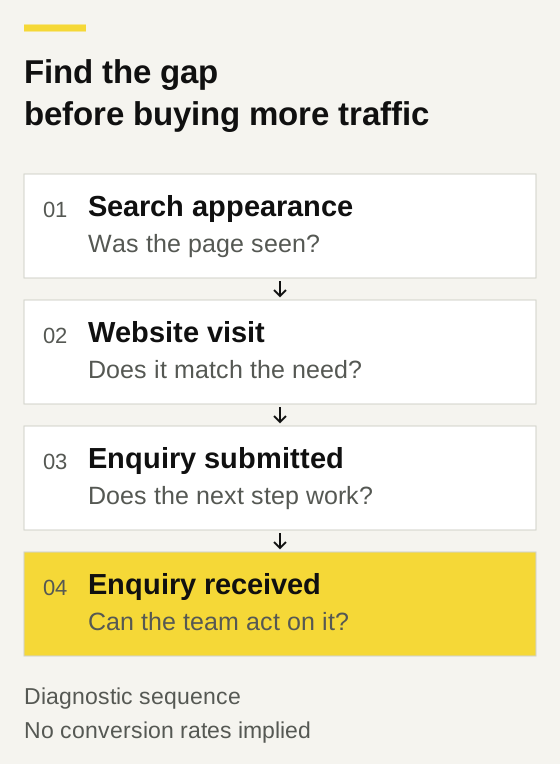
Check what the report is counting
An impression isn’t a website visit. In Google Search Console, impressions generally count appearances in search results; clicks count interactions that take someone to your site.
Keep paid-ad reports separate from organic search reports. Then work towards the business result: which visits led to an enquiry your team actually received?
Choose a period you can compare consistently. A handful of visits or enquiries gives you very little basis for declaring that a page works or fails.
To improve your website conversion rate, first agree which action counts as a conversion.
Follow the visitor’s reason for arriving
Look at the search queries available to you and the pages people land on. Ask whether that page answers what someone came to find.
For example, a homeowner searching for a repair may arrive on a page explaining how to do it themselves. That visit can be useful to them without becoming an enquiry for your business. More of the same traffic may produce the same result.
For a service enquiry, check whether the page makes the fit clear. Can the visitor tell whether you do this kind of work in their area? Is there relevant work or another credible reason to trust you with the job?
Use the actual landing page for this check. Someone coming from a search result may never see your homepage.
Try the next step on your phone
Open the page on a phone and attempt the enquiry you want a customer to make.
Follow the call link. Fill in the form. Notice anything you have to guess, such as whether the business handles smaller jobs or what happens after you submit.
Ask someone unfamiliar with the site to try it too. Watch where they hesitate before explaining what they’re meant to do. Their questions give you something concrete to fix.
An AI assistant might help answer recurring questions. First make those answers clear on the page and decide which requests need a person. Adding a chat window won’t establish why visitors are leaving.
Trace one enquiry all the way through
Submit an identifiable test enquiry and confirm that it reaches the person responsible for replying. Follow it into the inbox or job system. Check who owns the next action.
A recorded conversion doesn’t establish that this happened. Google’s GA4 lead-measurement tutorial, for example, shows how a confirmation-page view can become a lead key event. That event records the configured action; you still need to check delivery and receipt.
Once the route works, record whether real enquiries receive a reply. A website report alone can’t tell you where a request went after submission.
Change the part you have evidence for
If a test enquiry never arrives, fix delivery first. If visitors keep asking whether you serve their suburb, make the service area easier to find. Each finding gives the next change a reason.
Keep a record of what changed and compare similar periods afterwards. With low traffic, allow time and look at enquiry quality as well as the count.
CBD’s website design and update service includes enquiry forms, handovers and measurement. Bring your website and the report that’s worrying you. The first useful output is a clear account of what happens between a visit and a received enquiry.